
Manage your account and sign-in
Update your merchant profile and recover access to your dashboard.
Access depends on your current plan, permissions and store configuration.
Before you start
Use the email address associated with your merchant account.
Open the relevant dashboard screen ↗Steps
Sign in using one of the methods displayed on the login screen, such as your password or email verification code.
Open Account to review your profile details.
Use the change-password form when you need a new password.
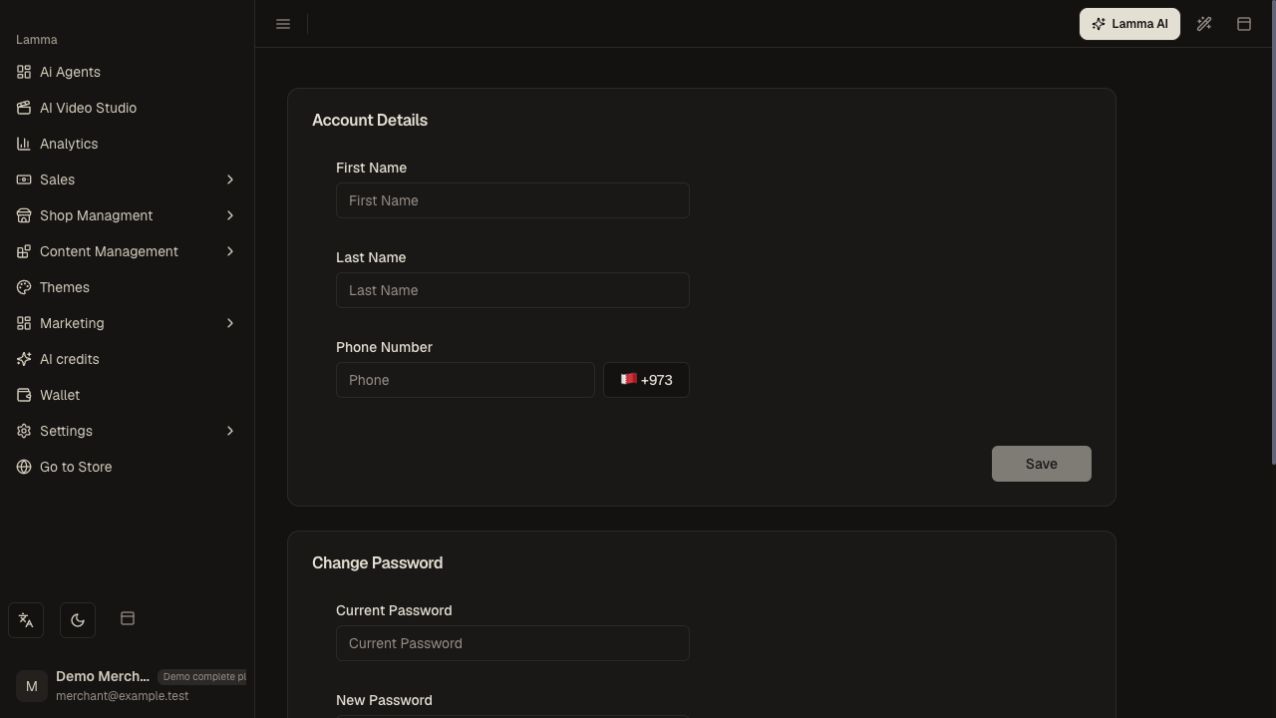
Step 3 — Review your profile and locate the change-password form; keep password fields empty.Demonstration store · sample data. Available features may differ by plan or rollout.View full-size screenshot ↗ If you cannot sign in, open Forgot Password and follow the reset flow.
Sign out on shared devices and sign back in to confirm your new details work.
What to check afterward
Your merchant profile is current and you can access the correct store.
If something does not work
Merchant dashboard access and a shopper account on a storefront are different. If a reset email does not arrive, check spam and confirm the address before requesting another.
Still need help? Contact Lamma support with your store, the affected record and the exact error. Keep passwords and API keys private.