
Activate and manage add-ons
Find the optional capabilities available for your store and configure them.
Access depends on your current plan, permissions and store configuration.
Before you start
Read the current add-on terms, price and prerequisites before activating.
Open the relevant dashboard screen ↗Steps
Open Add-ons and inspect the catalog returned for your account.
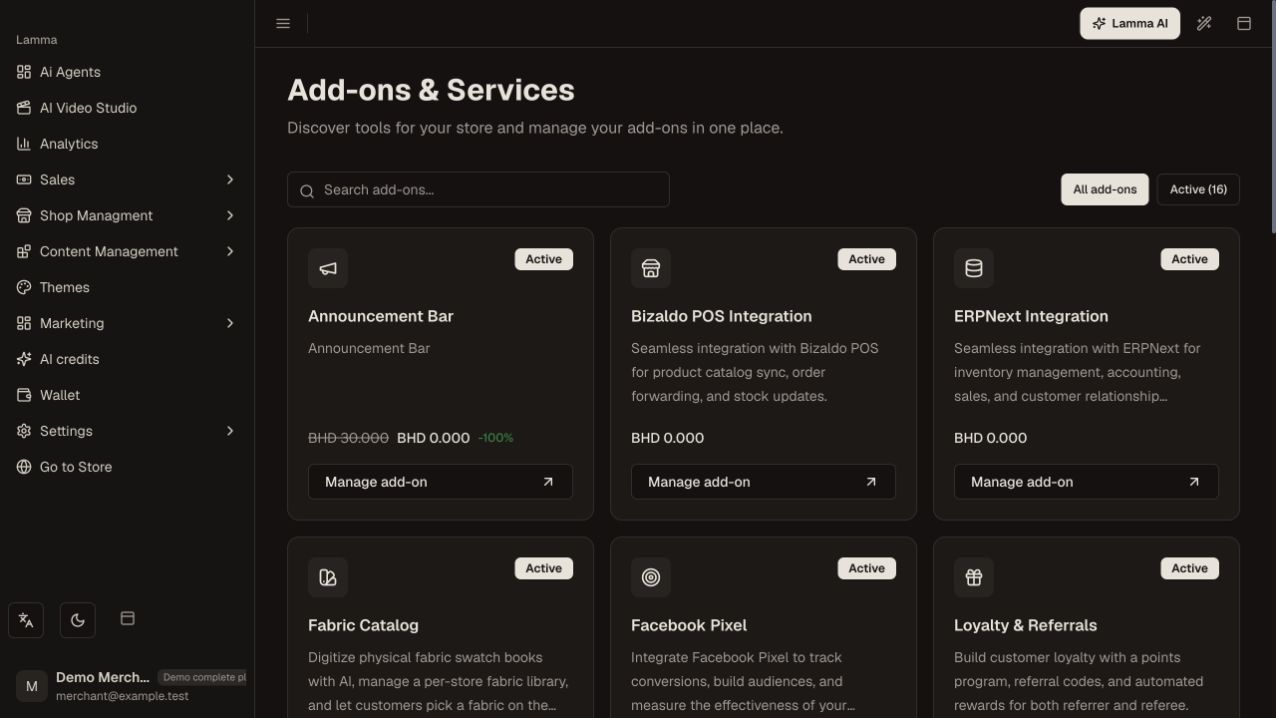
Step 1 — Review the add-ons returned for your store and check their current access state.Demonstration store · sample data. Available features may differ by plan or rollout.View full-size screenshot ↗ Open the add-on details and distinguish a free activation, paid purchase, subscription or supported trial.
Confirm the displayed price and any valid coupon before purchasing.
Wait for confirmed activation and open its management/configuration screen.
Enter the required settings and run the connection test when available.
Test the actual feature and review deactivate/reactivate options before changing a working integration.
What to check afterward
The add-on has a confirmed access state and the configuration needed for use.
If something does not work
Purchasing access does not configure a third-party account. Catalog seed prices are not a public price guarantee. Some payment services require platform support to grant access.
Still need help? Contact Lamma support with your store, the affected record and the exact error. Keep passwords and API keys private.