
Work safely with ERP-linked products
Understand why some linked product fields cannot be edited locally.
Access depends on your current plan, permissions and store configuration.
Before you start
Identify the active integration and which system owns the product catalog.
Open the relevant dashboard screen ↗Steps
Open the linked product and read any integration-managed field message.
Make source-owned changes in the connected ERP or inventory system.
Use Lamma for the local presentation fields that remain editable.
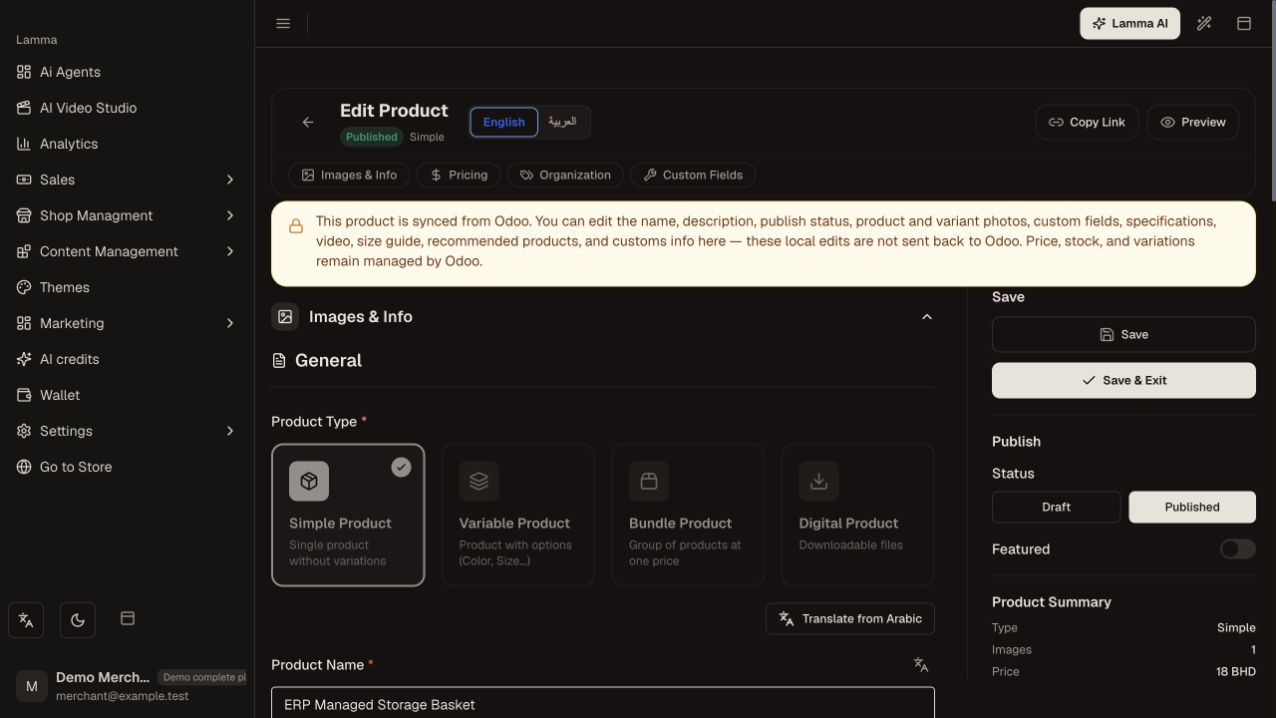
Step 3 — Read the integration-managed field message and edit only the local presentation fields that remain available.Demonstration store · sample data. Available features may differ by plan or rollout.View full-size screenshot ↗ Check import/sync status and errors after the upstream change.
Verify stock, price, categories and variants on the storefront.
Contact support with both product references if the systems disagree.
What to check afterward
Catalog changes retain their external linkage and the correct system remains authoritative.
If something does not work
Repeated local edits can be overwritten or rejected. Do not remove a linkage, duplicate a product or clear a catalog merely to bypass a managed-field restriction.
Still need help? Contact Lamma support with your store, the affected record and the exact error. Keep passwords and API keys private.