
Download invoices and thermal receipts
Print or save order documents individually or in a batch.
Access depends on your current plan, permissions and store configuration.
Before you start
Select the correct order and verify its customer and item details.
Open the relevant dashboard screen ↗Steps
Open the order details and use the available invoice or thermal receipt download action.
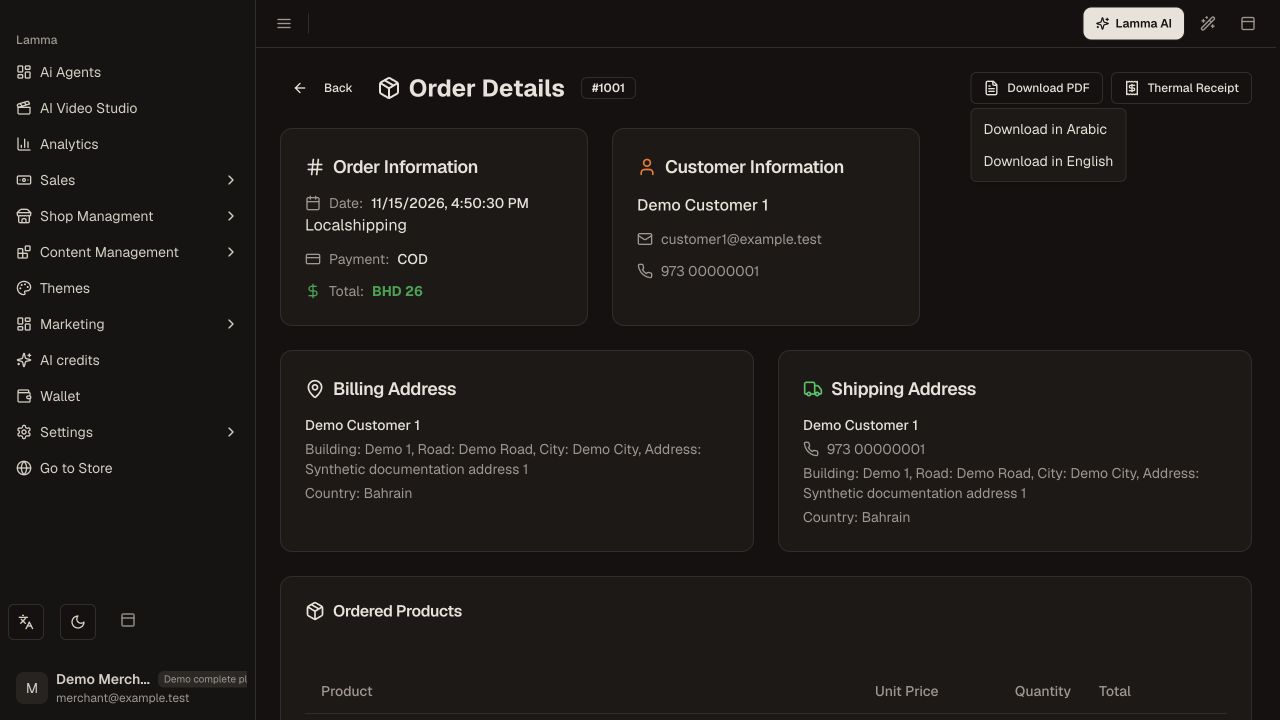
Step 1 — Use the order’s invoice or thermal receipt action and review the document before printing.Demonstration store · sample data. Available features may differ by plan or rollout.View full-size screenshot ↗ Review the document before sending or printing it.
From the order list, select the intended orders for a bulk download where offered.
Choose the supported document type and wait for the download to complete.
Check page size and printer settings when using thermal paper.
What to check afterward
You have the generated documents for the selected orders.
If something does not work
If download fails, retry one order to isolate the issue. Confirm pop-up or download restrictions and verify your account still has access. An invoice does not prove payment settlement.
Still need help? Contact Lamma support with your store, the affected record and the exact error. Keep passwords and API keys private.