
Read sales and payment reports
Separate order activity, recorded payments and money received.
Access depends on your current plan, permissions and store configuration.
Before you start
Choose the period and understand the store timezone and report currency.
Open the relevant dashboard screen ↗Steps
Open Sales and set the available date, status and gateway filters.
Review payment records alongside their related orders.
Export the filtered payment report when you need to reconcile outside the dashboard.
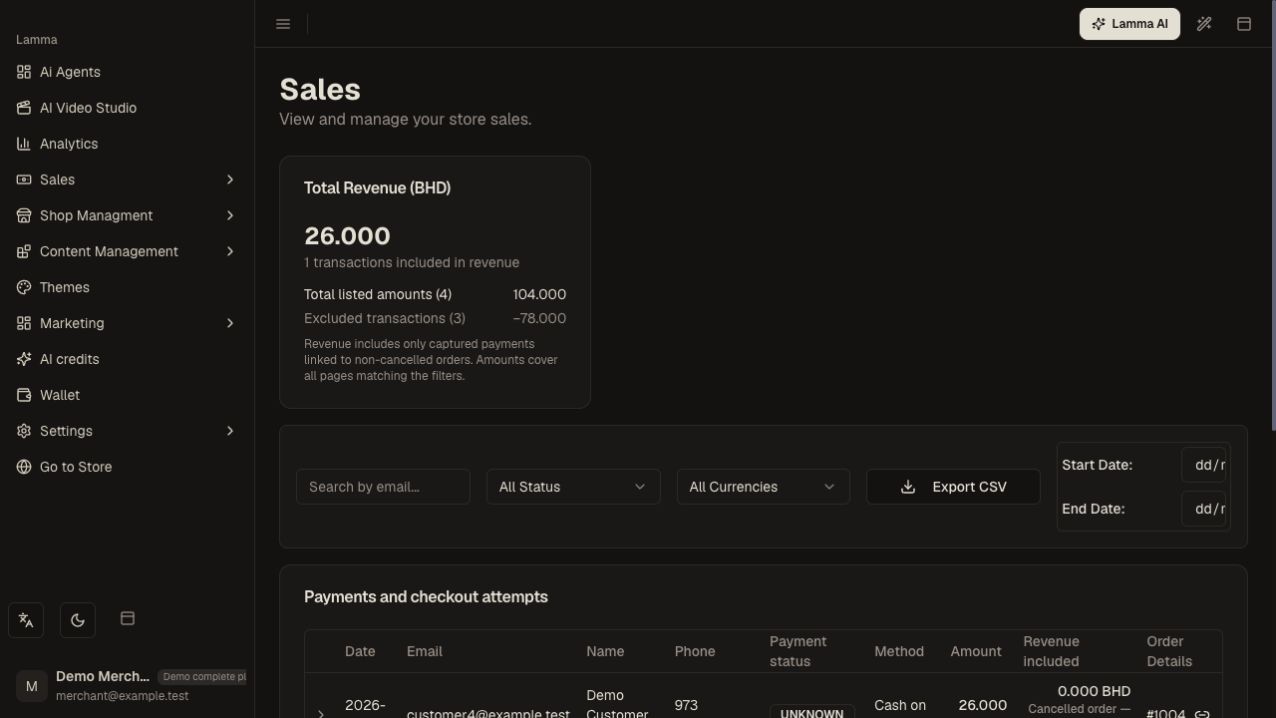
Step 3 — Filter the payment records by date, payment status and currency before exporting the report.Demonstration store · sample data. Available features may differ by plan or rollout.View full-size screenshot ↗ Use Analytics for store trends and conversion context.
Compare settlements and refunds against the gateway or courier records rather than treating every order as collected cash.
What to check afterward
You have a filtered record of sales/payment activity and can investigate individual differences.
If something does not work
Pending or failed payment attempts are different from completed sales. COD orders may be confirmed before the courier remits funds. Check the report definition and the order/payment state before comparing totals.
Still need help? Contact Lamma support with your store, the affected record and the exact error. Keep passwords and API keys private.