
Create and manage Lamma Ads campaigns
Use the available ChatGPT Ads integration with explicit budget and activation controls.
Requires provider account eligibility and API access. Instagram/Facebook campaign management is not implemented in Lamma Ads.
Before you start
Requires an eligible advertiser account with the necessary provider API permissions.
Open the relevant dashboard screen ↗Steps
Connect your Advertiser API key through the connection form and verify the displayed account and currency.
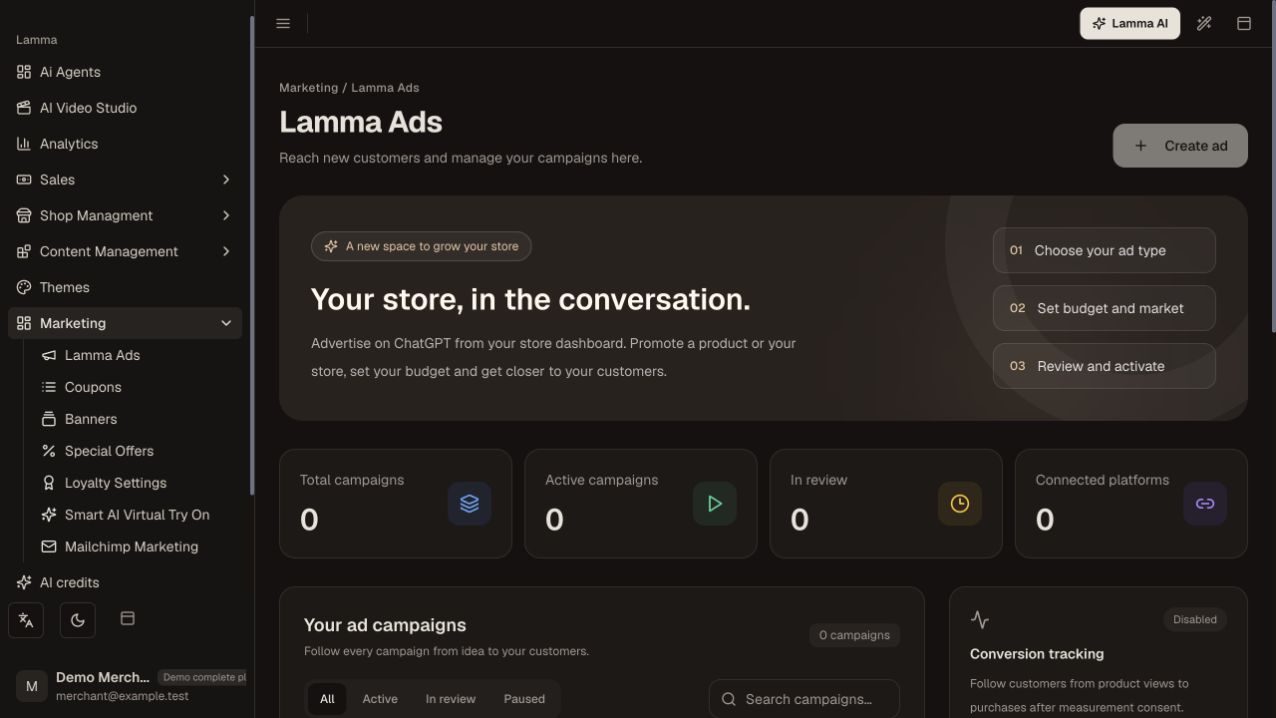
Step 1 — Check the ad-account connection before creating a campaign; this demo has zero connected platforms and Create ad is disabled.Demonstration store · sample data. Available features may differ by plan or rollout.View full-size screenshot ↗ Choose a published product or a general store promotion; supply the title, text, public image and HTTPS destination.
Set the lifetime budget, maximum click bid, end time and target Gulf countries.
Create the campaign and review its paused state and provider review status.
Activate only after the account/ad reviews are approved and you have confirmed the account and budget.
Use the pause and reporting controls to manage delivery.
What to check afterward
A campaign is created paused; explicit eligible activation is a separate step that can start spend.
If something does not work
This integration does not manage Meta campaigns. Missing advertiser permissions or account approval can block delivery. A normal AI inference key is not an Advertiser API key.
Still need help? Contact Lamma support with your store, the affected record and the exact error. Keep passwords and API keys private.