
Sell a product bundle
Combine component products into one offer with a bundle selling price.
Access depends on your current plan, permissions and store configuration.
Before you start
Create the component products and verify their stock.
Open the relevant dashboard screen ↗Steps
Open the product editor and choose the bundle product type when available.
Search for and add the component products.
Set the number of each component included in one bundle.
Enter the bundle selling price; it covers the entire bundle rather than each individual component.
Review the available bundle count calculated from component stock.
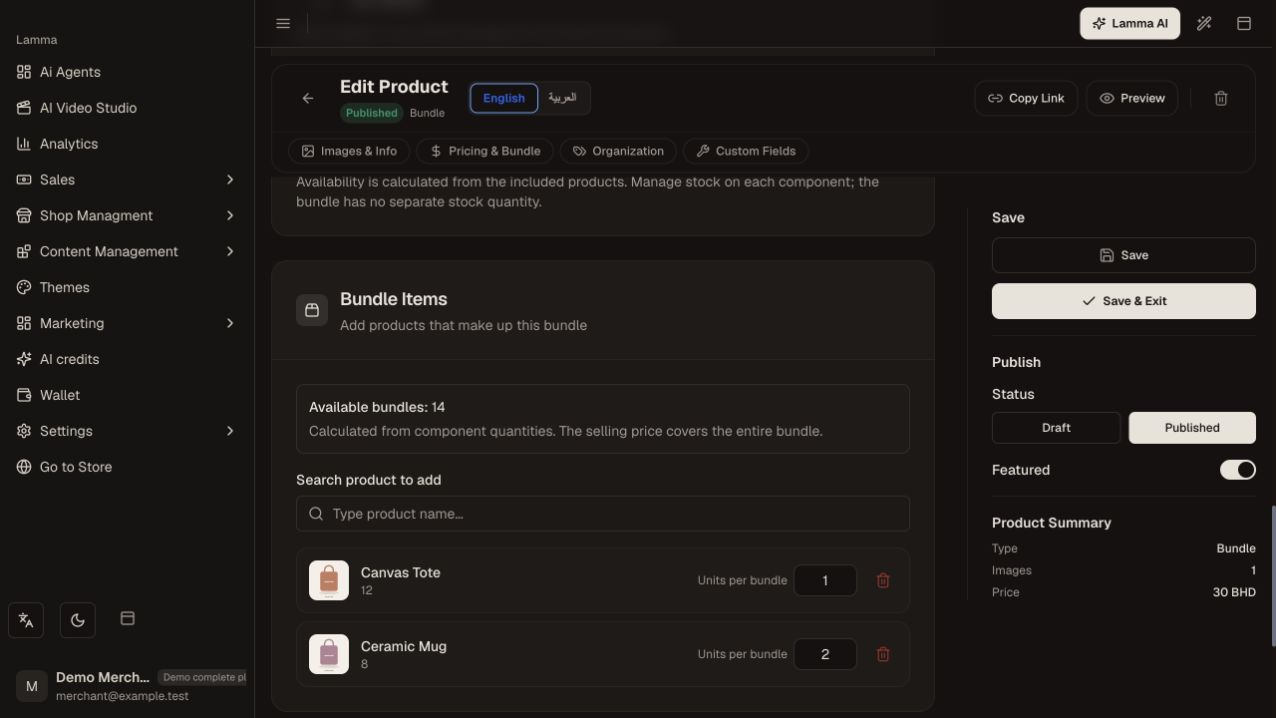
Step 5 — Check component quantities, the full bundle selling price and the bundle count supported by stock.Demonstration store · sample data. Available features may differ by plan or rollout.View full-size screenshot ↗ Save and test the bundle in the storefront cart.
What to check afterward
Customers buy the configured bundle and its availability reflects the required components.
If something does not work
A bundle can be unavailable while some components still have stock: every required component must cover its quantity. Check component quantities before changing the bundle price.
Still need help? Contact Lamma support with your store, the affected record and the exact error. Keep passwords and API keys private.