
Connect and use delivery providers
Understand provider availability, accounts, services and shipment actions.
Access depends on your current plan, permissions and store configuration.
Before you start
Have the provider account or Lamma-enabled service required by your store.
Open the relevant dashboard screen ↗Steps
Open the shipping method editor and use the active provider list returned for your store.
Complete the provider setup fields or account setup action offered.
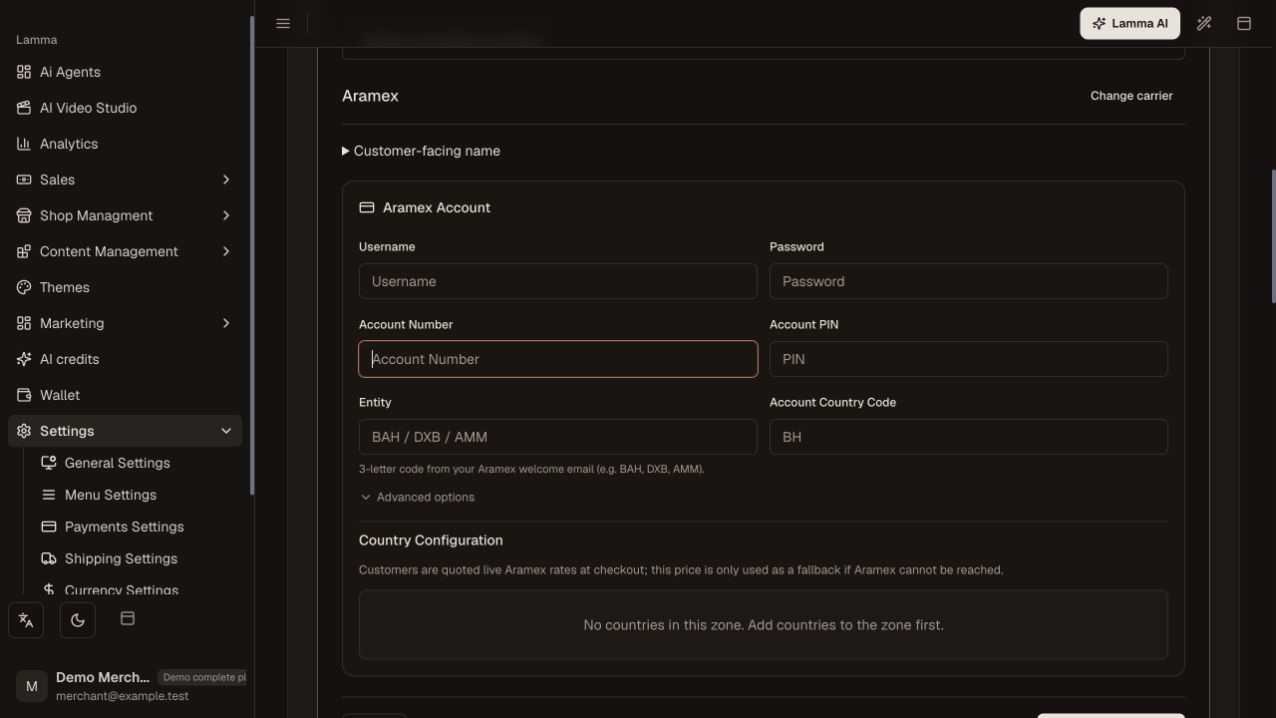
Step 2 — Enter the selected provider’s account details in its protected configuration form; configure delivery coverage separately.Demonstration store · sample data. Available features may differ by plan or rollout.View full-size screenshot ↗ Confirm pickup/sender details and choose an eligible service.
Configure customer-facing zone rates separately from provider shipment charges.
Create one authorized shipment and inspect its label and tracking.
Use the provider actions offered for that shipment, such as pickup, tracking history or cancellation.
What to check afterward
An available provider is configured for the destinations and services you actually use.
If something does not work
The code includes provider-specific paths for services such as Ubex, Aramex, Naql, SMSA, DHB, Sayq and Logestechs. This does not mean every provider is active for every merchant or destination; use your store list.
Still need help? Contact Lamma support with your store, the affected record and the exact error. Keep passwords and API keys private.