
Understand AI Video Studio availability
Review the fashion-video workflow and its current rollout limits.
New/local implementation reviewed on 16 November 2026. Production rollout and supported model/style catalog must be confirmed.
Before you start
This is new implementation work; confirm release access and catalog readiness with support.
Open the relevant dashboard screen ↗Steps
When enabled, open AI Video Studio and review the models and video styles actually published for your store.
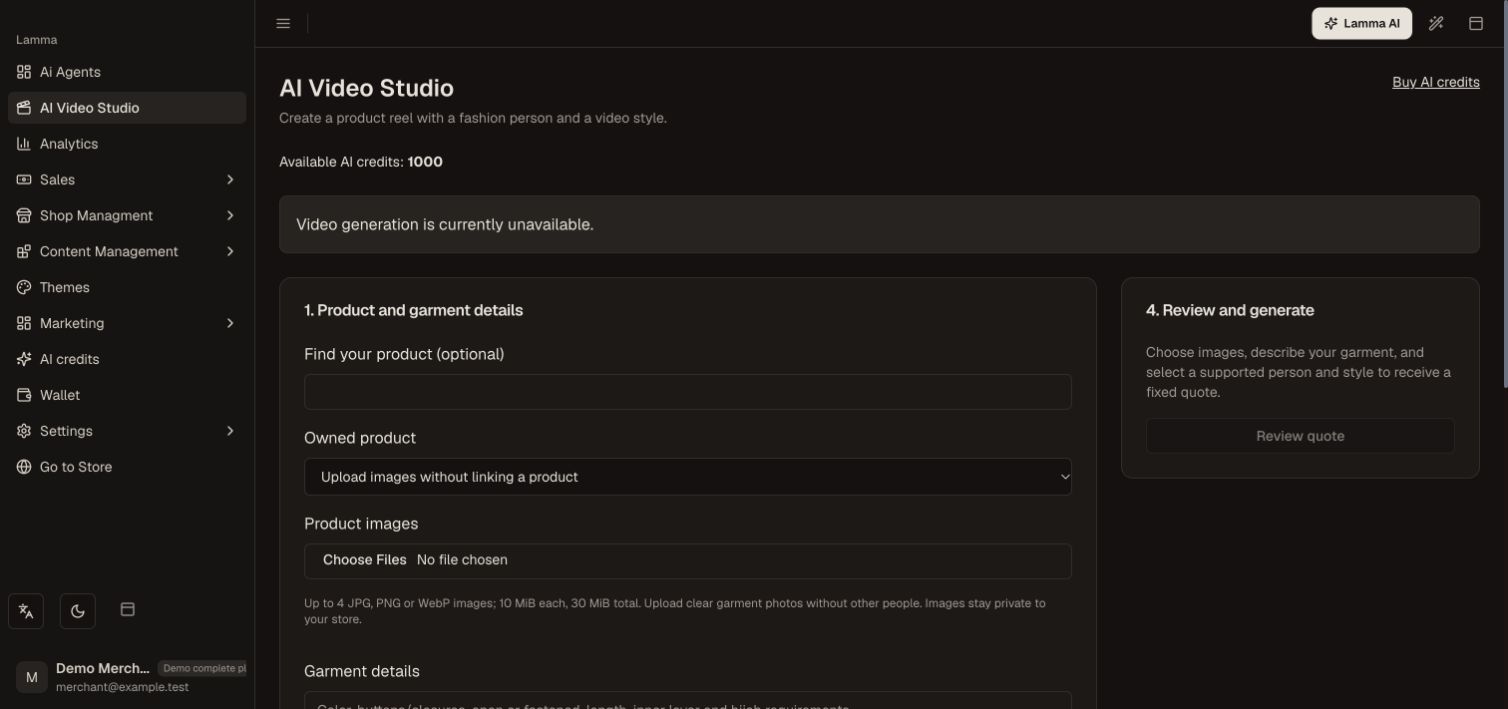
Step 1 — Check Video Studio availability before starting a job; generation is unavailable in this demo.Demonstration store · sample data. Available features may differ by plan or rollout.View full-size screenshot ↗ Upload the required garment/product media and make the supported model/style selections.
Request a quote and review the model fee, video fee and total credits before accepting it.
Start one job and follow its saved status.
Wait for required quality review; download or attach only an approved result.
If a job is uncertain or under review, contact support with its reference instead of starting another paid generation.
What to check afterward
An enabled, approved job can expose a download and an explicit product-attachment action.
If something does not work
Local code is not proof of production availability. Different-person motion transfer and arbitrary footage are not guaranteed. A pending review is not a finished merchant download.
Still need help? Contact Lamma support with your store, the affected record and the exact error. Keep passwords and API keys private.