
Understand AI credits and purchases
Check available AI usage and distinguish it from other store balances.
Access depends on your current plan, permissions and store configuration.
Before you start
Open the current credit and purchase screens for the latest allowances and prices.
Open the relevant dashboard screen ↗Steps
Review the available AI balance and any monthly versus purchased-credit information displayed.
Check the credit requirement before starting an AI operation.
Open purchase options when you need additional credits and review the exact amount and payment flow.
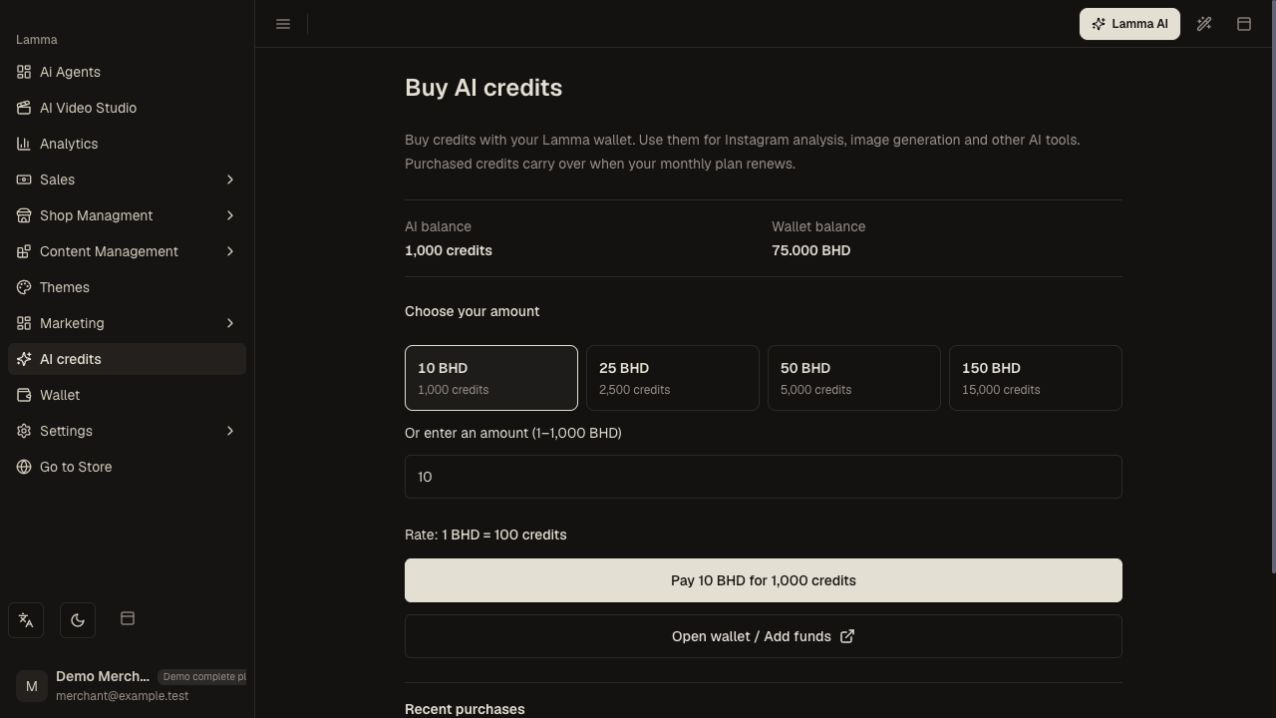
Step 3 — Review the available AI credit packages and exact purchase amount before continuing to payment.Demonstration store · sample data. Available features may differ by plan or rollout.View full-size screenshot ↗ Complete the purchase and verify the resulting balance or purchase state.
For a running or uncertain generation, inspect its status before submitting the same request again.
What to check afterward
You understand the available general AI credits and can verify a purchase through the dashboard.
If something does not work
General AI credits, the merchant wallet, loyalty balances and VTO tokens are different systems. Do not assume one balance automatically funds another. Monthly renewal and held-credit behavior depend on the operation and current configuration.
Still need help? Contact Lamma support with your store, the affected record and the exact error. Keep passwords and API keys private.