
Configure WhatsApp and contact links
Give shoppers the correct business contact destination.
Access depends on your current plan, permissions and store configuration.
Before you start
Prepare your business WhatsApp number with its country code.
Open the relevant dashboard screen ↗Steps
Open Store Settings → WhatsApp.
Enable the floating WhatsApp/contact control offered by the form.
Enter the customer-service number and customize the greeting or message settings shown.
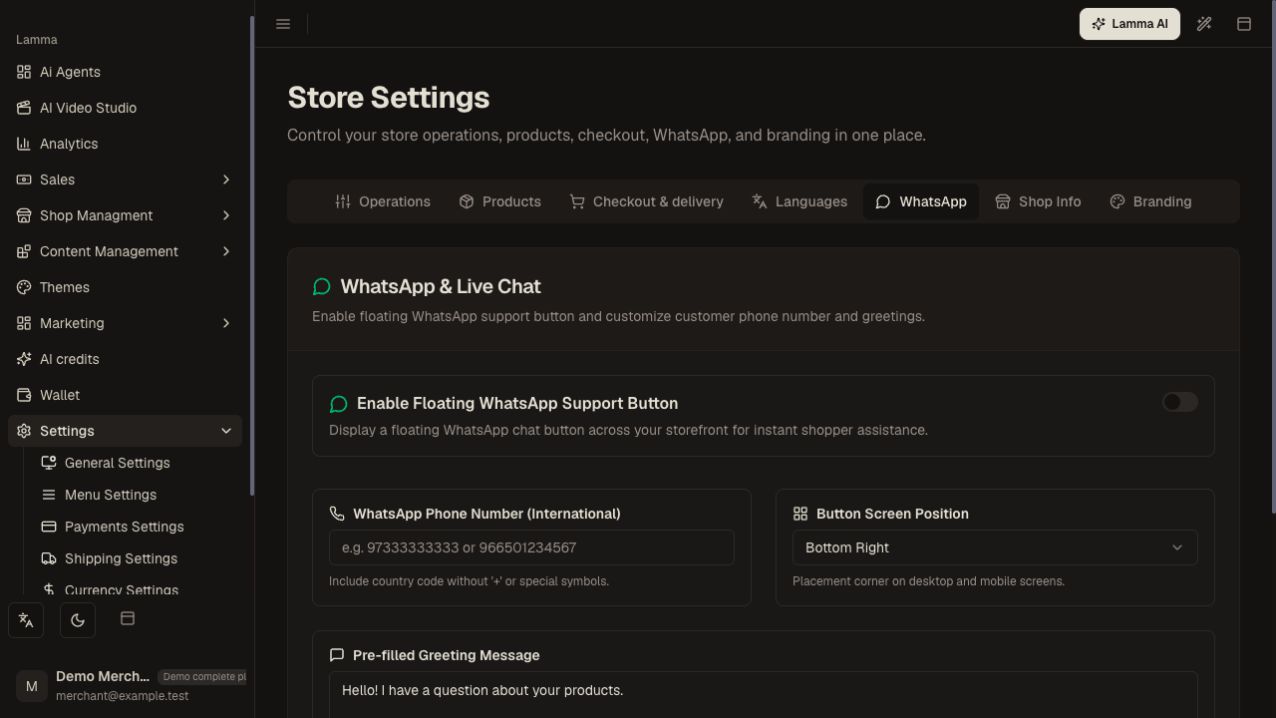
Step 3 — Enable the floating contact control and enter the service number and greeting offered by the form.Demonstration store · sample data. Available features may differ by plan or rollout.View full-size screenshot ↗ Review related business contact details and social links in Shop Info.
Save, open the storefront on mobile, and verify the button opens the correct number and message.
What to check afterward
Customers can reach the intended business contact from the storefront.
If something does not work
A storefront contact button does not prove that automated WhatsApp order notifications are configured. If a link fails, check country code, number formatting and the target WhatsApp account.
Still need help? Contact Lamma support with your store, the affected record and the exact error. Keep passwords and API keys private.