
Manage store operations and branding
Configure core store details, stock behavior, contact information and appearance.
Access depends on your current plan, permissions and store configuration.
Before you start
Record current settings before changing behavior customers rely on.
Open the relevant dashboard screen ↗Steps
Use Operations for maintenance mode, operational timezone and weight/dimension units.
Use Products for out-of-stock visibility, backorders, reviews and stock thresholds.
Use Shop Info for the business name, address and contact details.
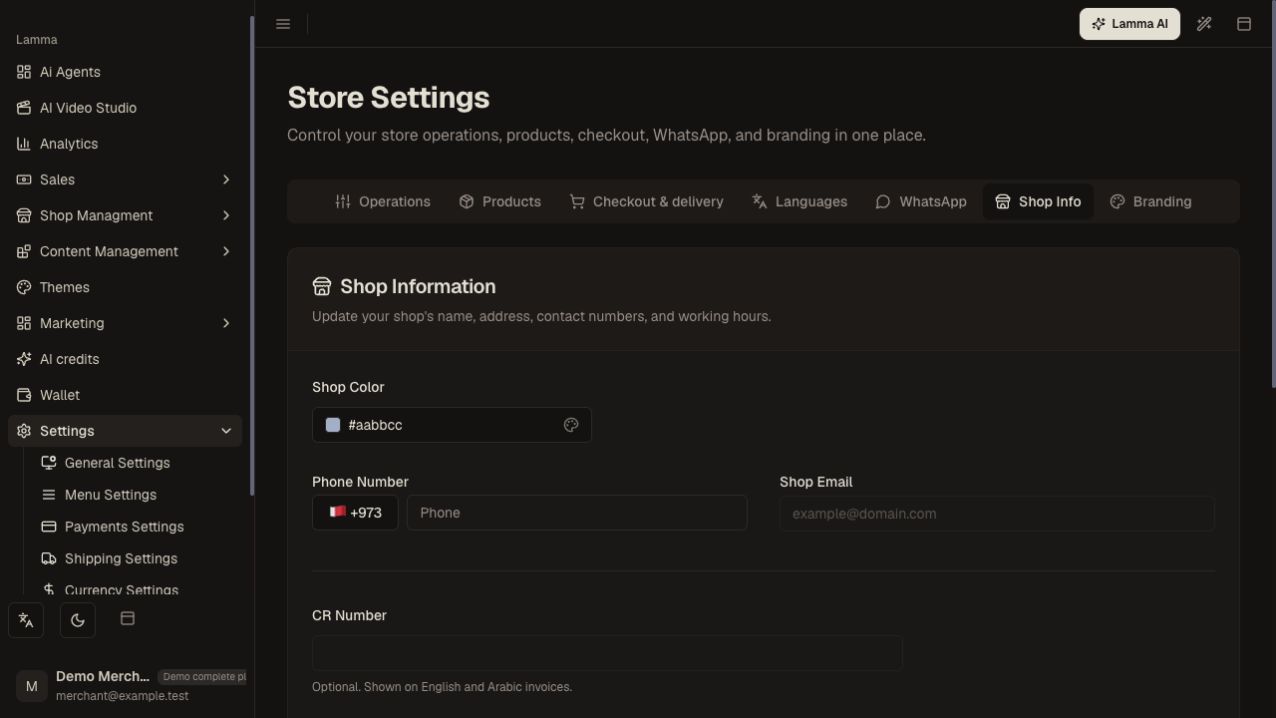
Step 3 — Use Shop Info to review and update the business phone number and email shown in the form.Demonstration store · sample data. Available features may differ by plan or rollout.View full-size screenshot ↗ Use Branding for the logo and controls offered by the current screen.
Save each form and confirm the saved value after reload.
Check the storefront and checkout when a setting changes customer behavior.
What to check afterward
The store uses current business details and the operational behavior you selected.
If something does not work
Different tabs may save independently. If a value returns after reload, inspect the form error and plan entitlement. Maintenance mode can intentionally prevent the normal shopping journey.
Still need help? Contact Lamma support with your store, the affected record and the exact error. Keep passwords and API keys private.