
Review abandoned carts
Understand unfinished shopping sessions and recovery options.
Access depends on your current plan, permissions and store configuration.
Before you start
An abandoned cart is an incomplete checkout, not a confirmed sale.
Open the relevant dashboard screen ↗Steps
Open Abandoned Carts and use the displayed filters.
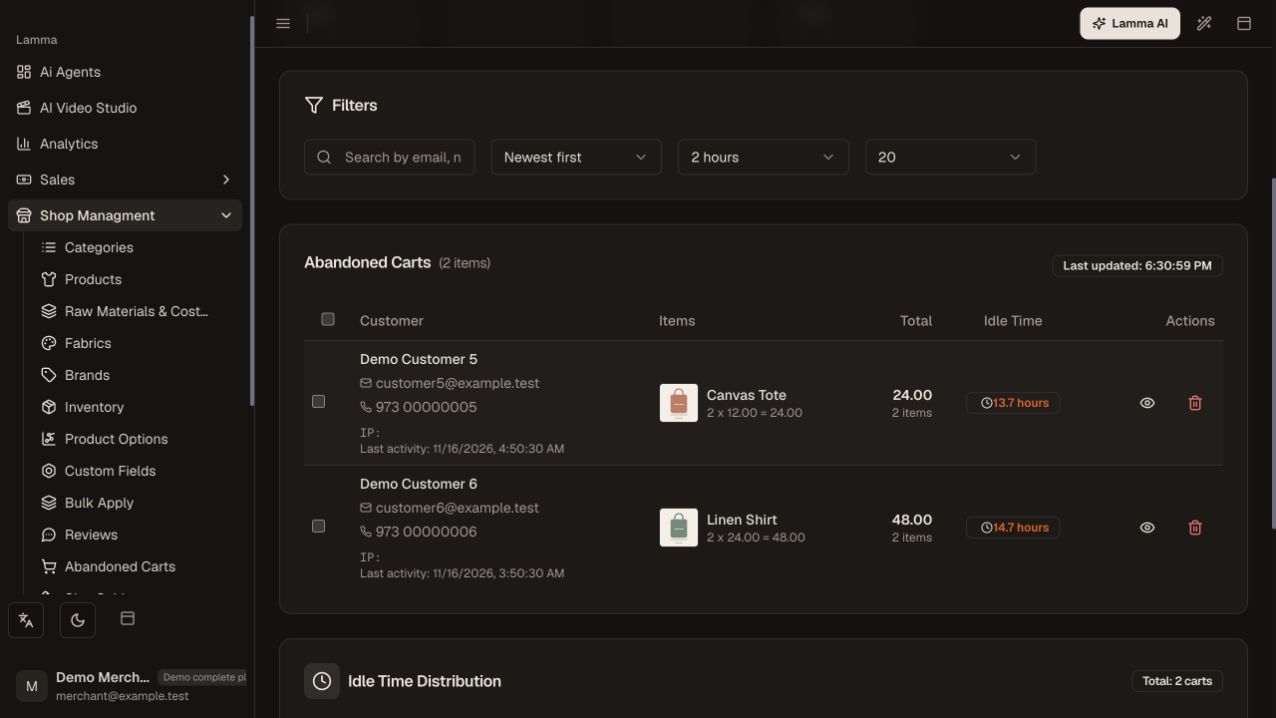
Step 1 — Use the abandoned-cart filters and review the listed items, totals and idle time before investigating recovery.Demonstration store · sample data. Available features may differ by plan or rollout.View full-size screenshot ↗ Open a cart to review items, value, activity and any available customer contact.
Identify recurring barriers such as shipping coverage, unavailable variants or payment errors.
If Mailchimp recovery is configured, review synchronization and the recovery flow there.
After a customer completes a purchase, use the resulting order as the fulfillment record.
What to check afterward
You can distinguish unfinished carts from actual orders and investigate friction.
If something does not work
Anonymous visitors may have no usable contact details. The cart list alone does not mean a reminder was sent, and its value should not be counted as revenue.
Still need help? Contact Lamma support with your store, the affected record and the exact error. Keep passwords and API keys private.