
Generate product and store copy
Use AI drafts for descriptions, short descriptions and supporting store content.
Access depends on your current plan, permissions and store configuration.
Before you start
Prepare accurate facts about the product or business and check available AI credits.
Open the relevant dashboard screen ↗Steps
Open the product or content form and choose the relevant AI generation action.
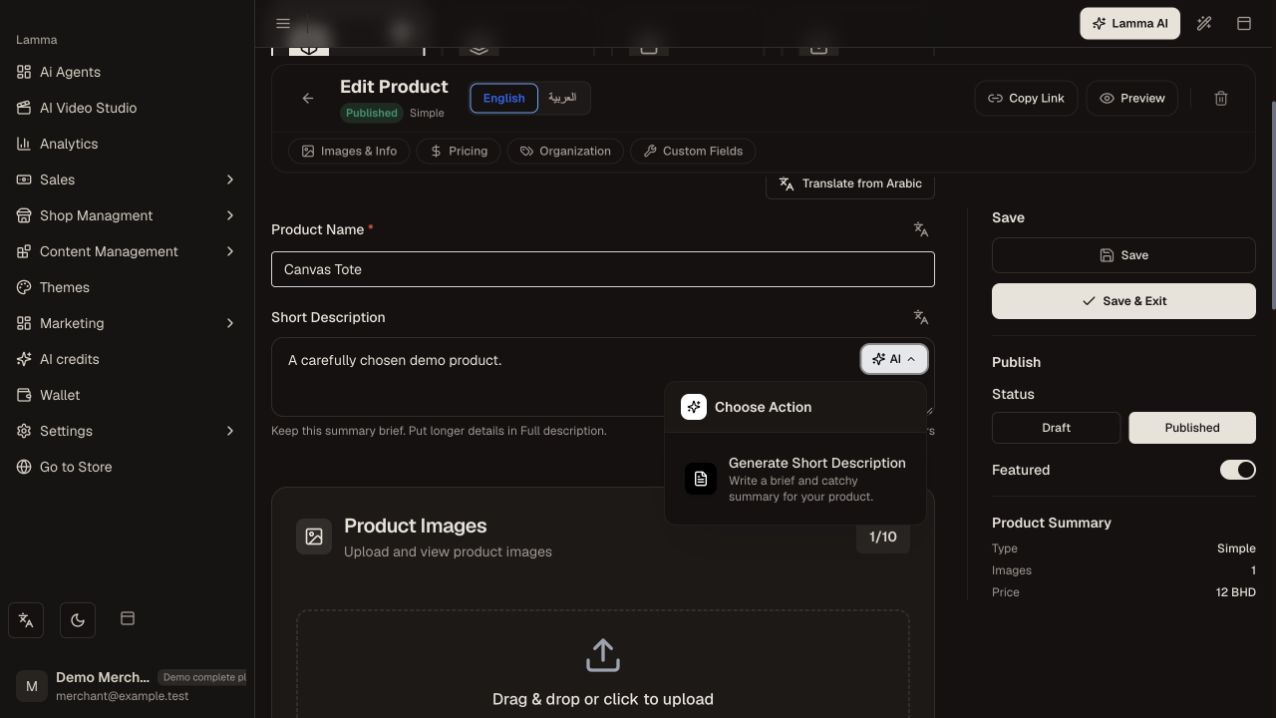
Step 1 — Open the AI action menu beside Short Description and choose Generate Short Description to begin.Demonstration store · sample data. Available features may differ by plan or rollout.View full-size screenshot ↗ Supply the requested product facts or image and choose the intended language where offered.
Wait for the returned draft.
Check every material, measurement, feature and delivery claim against your actual product.
Edit the text, then save the product or page through its normal save action.
Open the storefront to verify the final copy.
What to check afterward
The reviewed text is saved with the product or page you intended to update.
If something does not work
Generation and saving are separate actions. Do not rely on AI to infer ingredients, technical specifications or business policies from a photo alone.
Still need help? Contact Lamma support with your store, the affected record and the exact error. Keep passwords and API keys private.