
Use bulk edits, import and export
Apply catalog changes to many products while checking their scope.
Access depends on your current plan, permissions and store configuration.
Before you start
Keep a catalog export before making broad changes.
Open the relevant dashboard screen ↗Steps
Filter Products to the intended selection and review the selected count.
Use the offered bulk action for status, categories or other supported product values.
In Bulk Apply, preview the matched products and apply the chosen category/template operation.
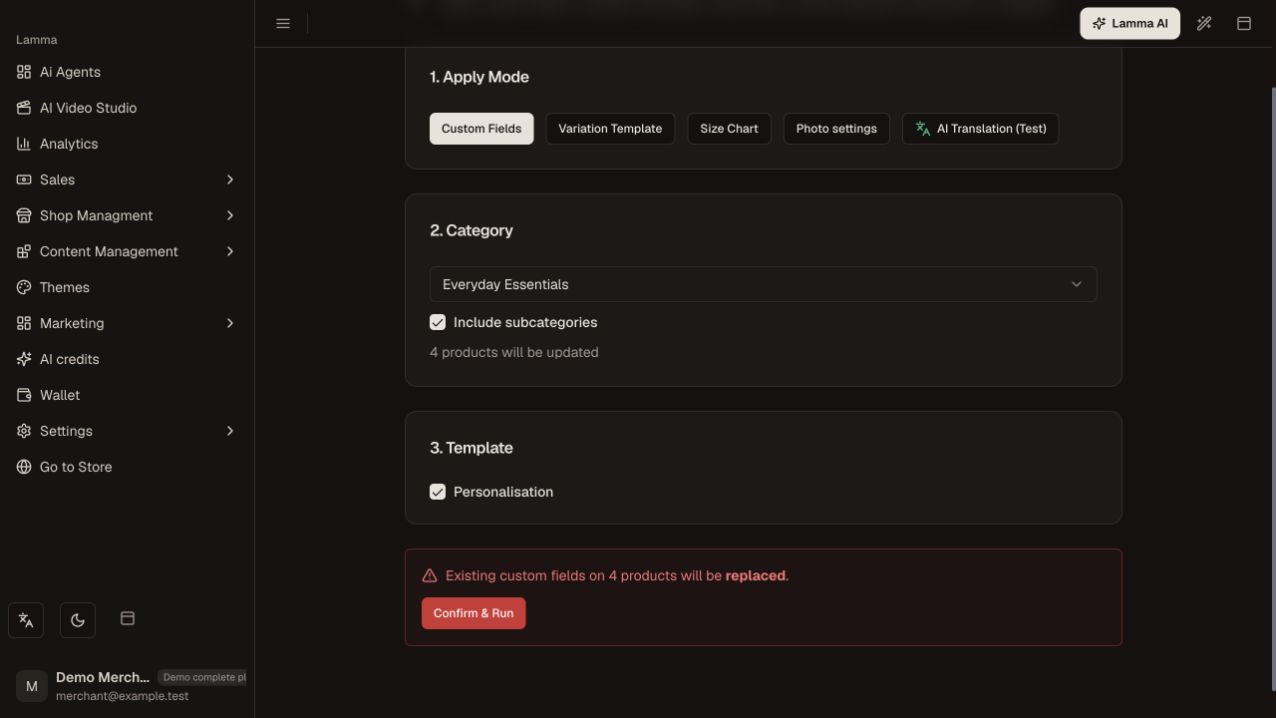
Step 3 — Check the selected category, matched product count, template and replacement warning before Confirm & Run.Demonstration store · sample data. Available features may differ by plan or rollout.View full-size screenshot ↗ For a file import, use the format and options shown by the import dialog and begin with a small sample.
Monitor the import or batch progress and inspect failed rows.
Export and spot-check affected products and variants after completion.
What to check afterward
The batch reports its outcome and the intended products have the saved changes.
If something does not work
Do not restart a still-running import because its screen was closed; check progress first. A completed job can contain failed items that need individual review.
Still need help? Contact Lamma support with your store, the affected record and the exact error. Keep passwords and API keys private.