
Handle gift orders and recipient details
Review gift information and complete the delivery address when needed.
Access depends on your current plan, permissions and store configuration.
Before you start
Open the order and identify the purchaser and recipient correctly.
Open the relevant dashboard screen ↗Steps
Open the gift order details and review the gift message and recipient information shown.
Check whether a complete delivery address is present.
Use the gift-address edit action when offered and enter the verified recipient address.
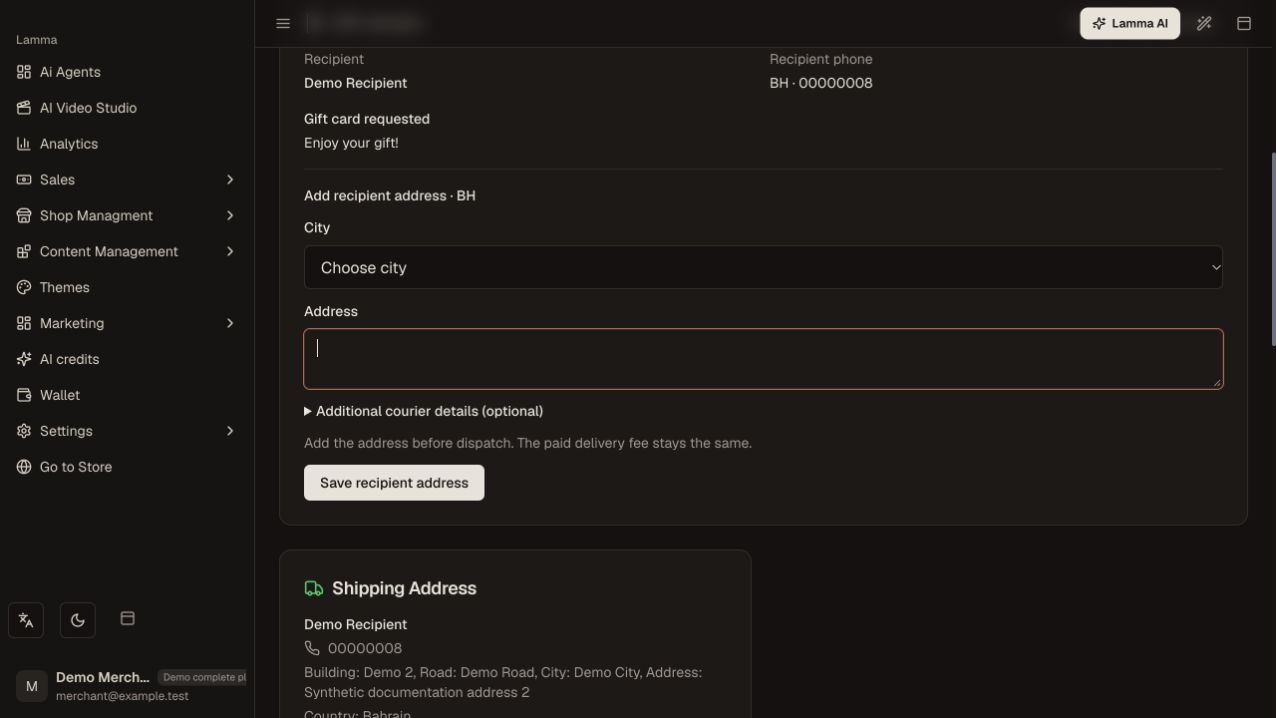
Step 3 — Review the gift recipient, then enter the verified city and address in the recipient-address form.Demonstration store · sample data. Available features may differ by plan or rollout.View full-size screenshot ↗ Save and check delivery eligibility before creating the shipment.
Verify that the shipping label uses the intended recipient and address.
What to check afterward
The gift order has the correct delivery information before fulfillment.
If something does not work
Do not assume the purchaser address is the recipient address. If shipment creation is blocked, check required address fields and the destination coverage.
Still need help? Contact Lamma support with your store, the affected record and the exact error. Keep passwords and API keys private.