
Arrange homepage sections
Control the content and order of the sections supported by your theme.
Access depends on your current plan, permissions and store configuration.
Before you start
Know which theme is active and what should appear first on mobile.
Open the relevant dashboard screen ↗Steps
Open the homepage sections screen from Themes.
Add or edit the section types the current editor supports.
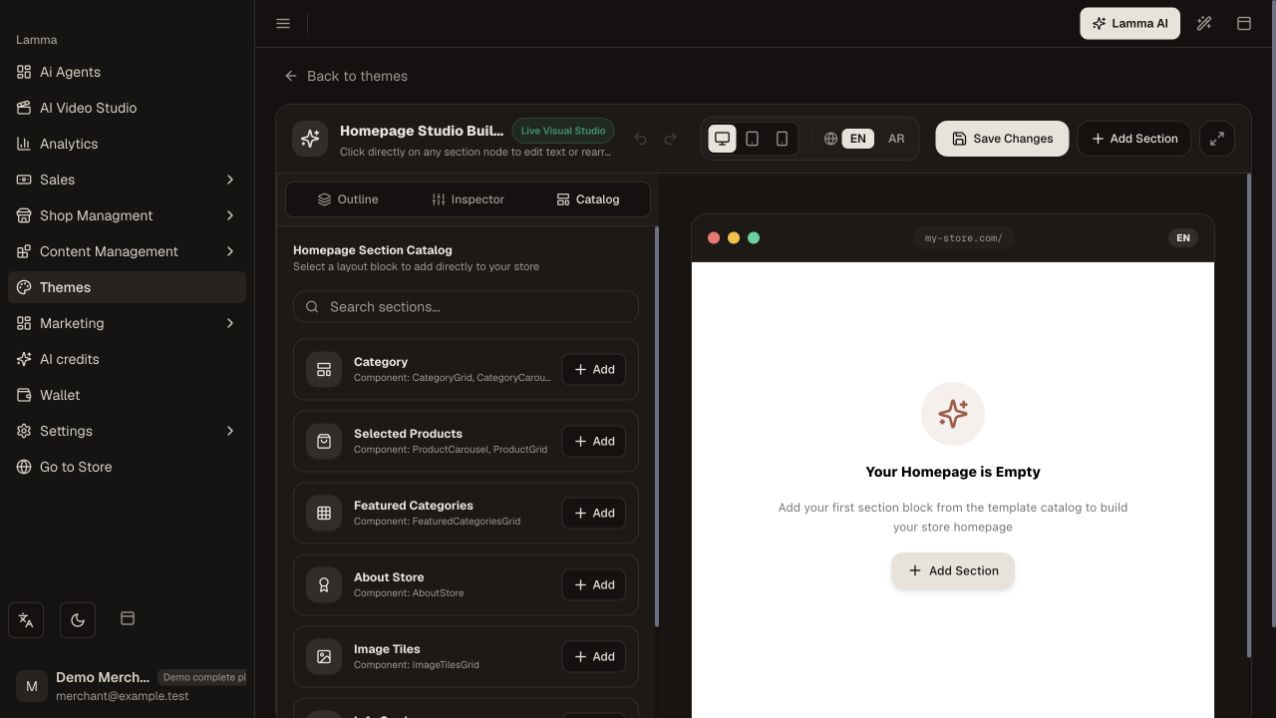
Step 2 — Open the section catalog and choose Add for the layout block you want to place on the homepage.Demonstration store · sample data. Available features may differ by plan or rollout.View full-size screenshot ↗ Select the intended products, categories or content and set visibility where offered.
Arrange sections in the desired order and save.
Open the storefront on a narrow screen and a desktop; check images, headings, links and the transition between sections.
What to check afterward
The homepage shows the saved sections in the intended order.
If something does not work
A section without eligible published products may appear empty. Check its product/category source and theme support before recreating it.
Still need help? Contact Lamma support with your store, the affected record and the exact error. Keep passwords and API keys private.