
Set your storefront languages
Choose the primary language and enable supported additional languages.
Access depends on your current plan, permissions and store configuration.
Before you start
Check multi-language access on your plan and prepare translated customer-facing content.
Open the relevant dashboard screen ↗Steps
Open Store Settings → Languages or the language settings screen.
Choose the primary storefront language.
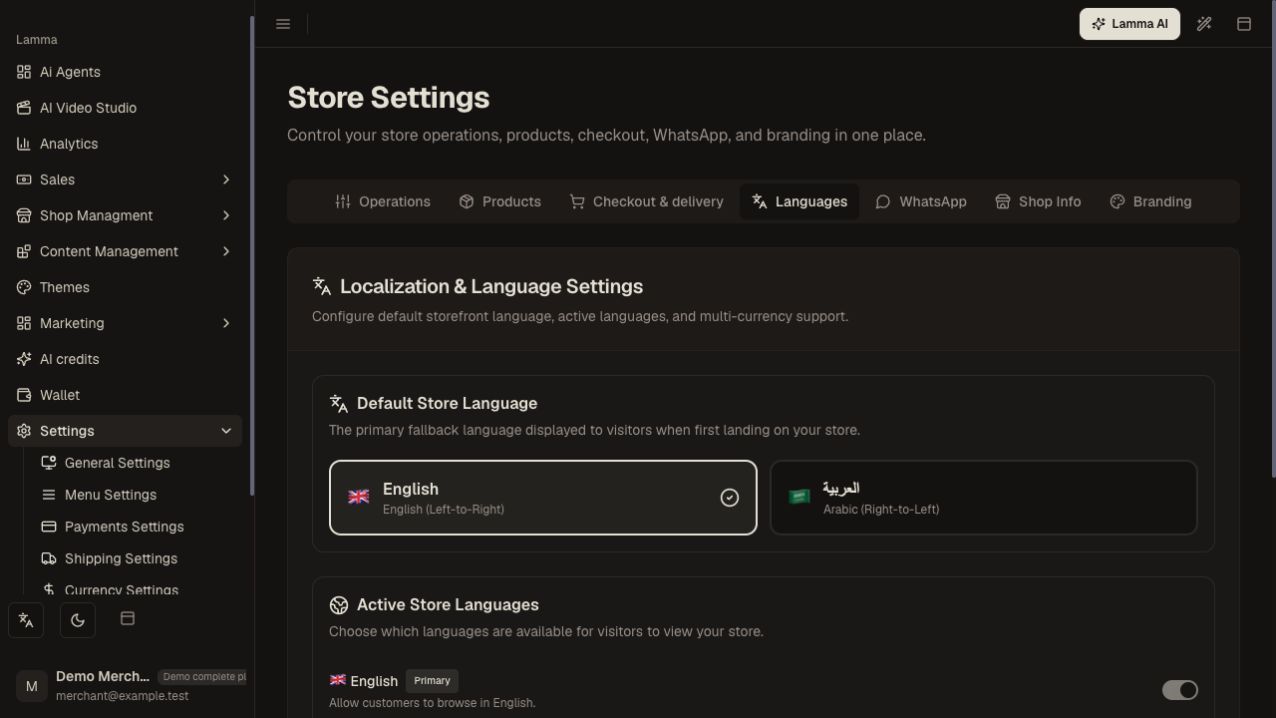
Step 2 — Choose the primary storefront language using the English or Arabic language card.Demonstration store · sample data. Available features may differ by plan or rollout.View full-size screenshot ↗ Enable Arabic and/or English according to the options and plan access shown.
Save and review product, category, page and menu content in each enabled language.
Switch languages on the actual storefront and check text direction, navigation and checkout.
Use AI translation for supported content when you need a draft.
What to check afterward
Shoppers can use the enabled languages with the content you have supplied.
If something does not work
The merchant interface language and storefront content language are different settings. Enabling English does not automatically translate every Arabic product or page.
Still need help? Contact Lamma support with your store, the affected record and the exact error. Keep passwords and API keys private.