
Build storefront navigation
Create menus linking to categories, pages, brands and other destinations.
Access depends on your current plan, permissions and store configuration.
Before you start
Create the pages and categories you intend to link.
Open the relevant dashboard screen ↗Steps
Open Menu Settings and select or create a menu.
Add items using the supported destination types or enter a custom URL.
Give each item a clear label in your enabled languages.
Arrange the items and any nested structure with the editor controls.
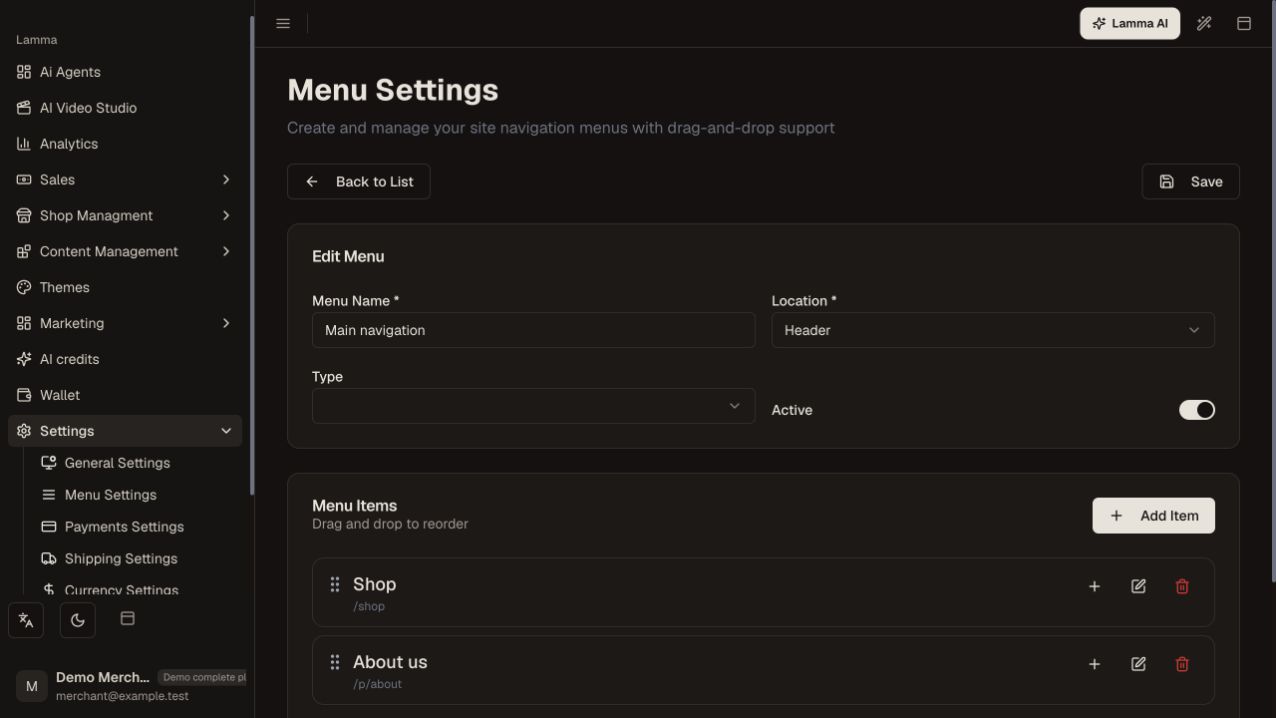
Step 4 — Give menu items clear bilingual labels and arrange their links and nested structure.Demonstration store · sample data. Available features may differ by plan or rollout.View full-size screenshot ↗ Save and verify the menu in the storefront header, mobile navigation or footer location used by your theme.
What to check afterward
The saved navigation reaches the intended destinations on desktop and mobile.
If something does not work
If a link is missing, check which menu the theme displays. If it opens an empty category, check product assignments and publication status.
Still need help? Contact Lamma support with your store, the affected record and the exact error. Keep passwords and API keys private.