
Configure customer loyalty and referrals
Review the earning, redemption and referral options available to your store.
Access depends on your current plan, permissions and store configuration.
Before you start
Activate the Loyalty & Referrals add-on, decide the rewards your business can honor and check the controls shown in your release.
Open the relevant dashboard screen ↗Steps
Open Loyalty Settings and review the enabled reward options.
Configure the earning and redemption values and any limits displayed.
Review referral settings separately from purchase rewards.
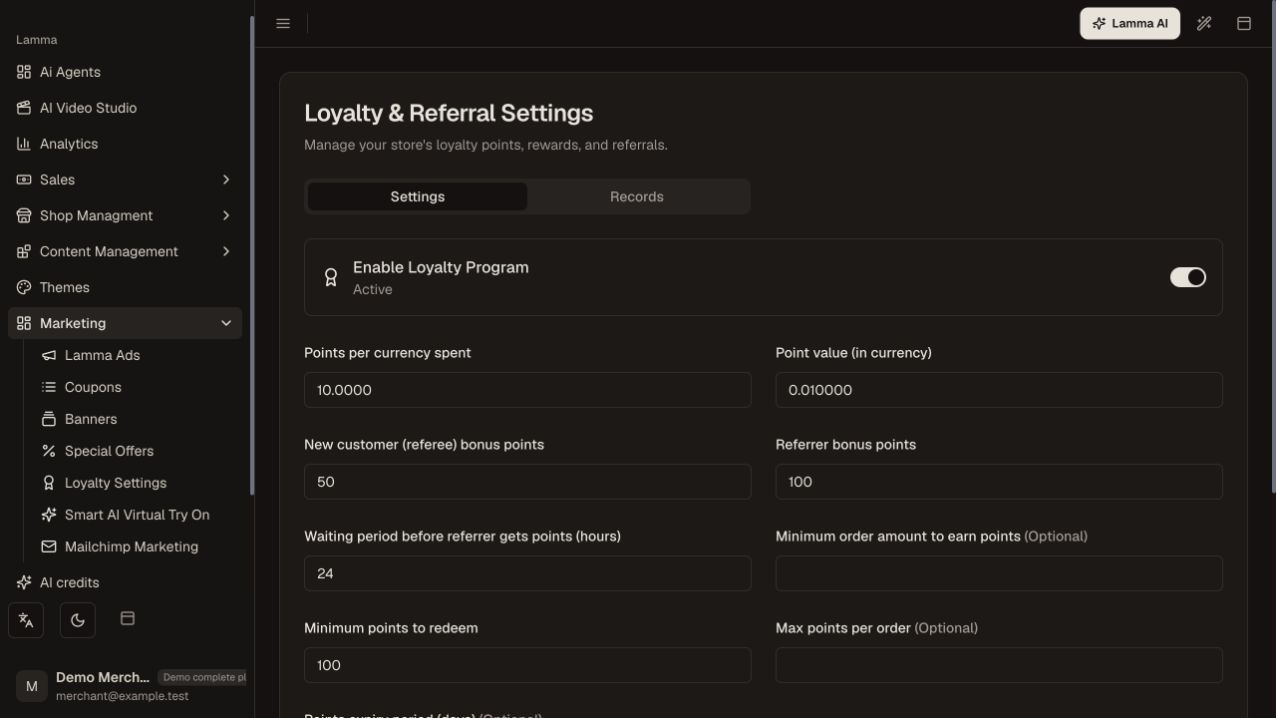
Step 3 — Review earning, redemption and referral settings separately before saving the loyalty program.Demonstration store · sample data. Available features may differ by plan or rollout.View full-size screenshot ↗ Save and inspect the customer loyalty wallet, transaction history and referral view on the storefront.
Test the displayed checkout calculation with an eligible customer before promoting the program.
Use the loyalty overview and recent transactions to investigate balance questions.
What to check afterward
Your saved reward rules are visible through the supported customer loyalty experience.
If something does not work
The merchant wallet, AI credits and a customer loyalty wallet are separate balances. A displayed reward balance may still be subject to redemption conditions.
Still need help? Contact Lamma support with your store, the affected record and the exact error. Keep passwords and API keys private.