
Offer pickup and scheduled fulfillment
Configure collection locations and the time slots your store supports.
Access depends on your current plan, permissions and store configuration.
Before you start
Prepare collection addresses, opening times and any capacity limits.
Open the relevant dashboard screen ↗Steps
Open Checkout & delivery and enable the supported pickup or appointment option.
Add a fulfillment location with clear address and contact information.
Create the offered time slots and configure their dates, hours or capacity.
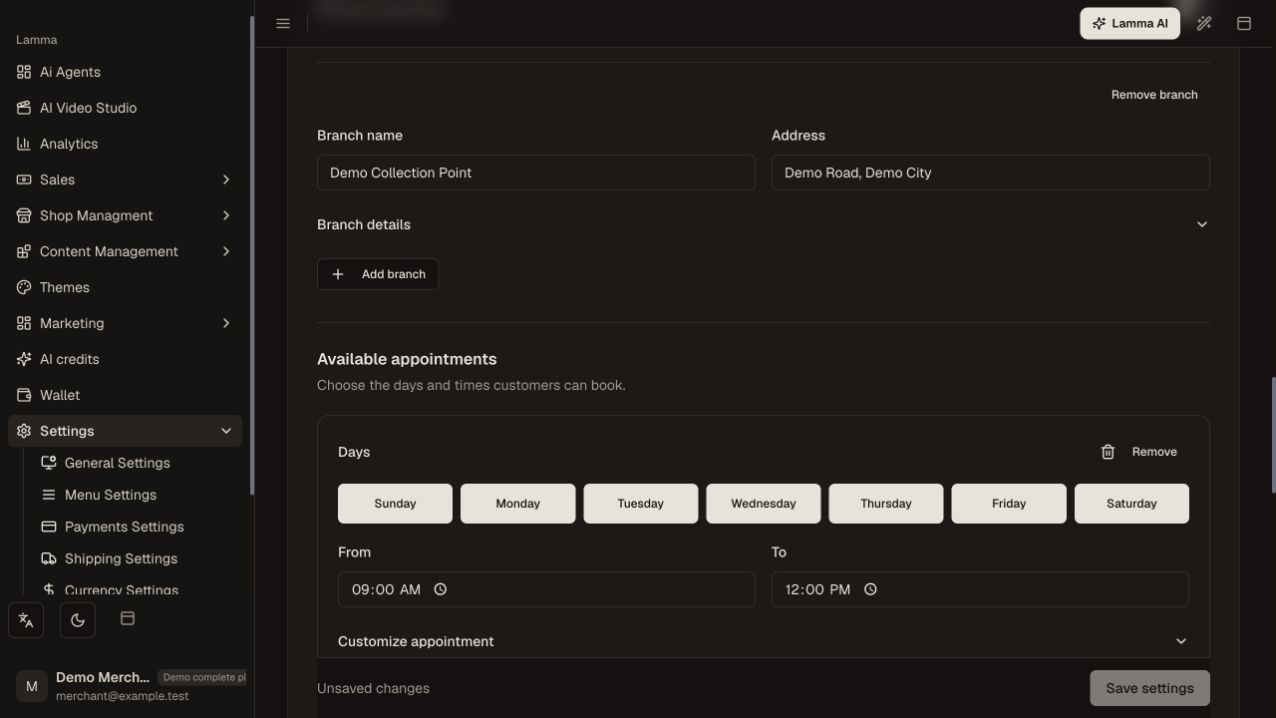
Step 3 — Configure the pickup or appointment location and the time slots customers may select.Demonstration store · sample data. Available features may differ by plan or rollout.View full-size screenshot ↗ Save the settings and confirm that the relevant method is enabled.
Start a checkout, select the method and slot, and verify the recorded choice on the order.
Keep slots current when your business hours change.
What to check afterward
Customers can choose an eligible location and available fulfillment time.
If something does not work
If no slots appear, check active dates, capacity, location status and method eligibility. A saved location alone does not ensure pickup is enabled at checkout.
Still need help? Contact Lamma support with your store, the affected record and the exact error. Keep passwords and API keys private.